
Download Slutta Classic – Quit Smoking, Snus Free, Motivation, Health Benefits, Tobacco-Free Journey
Overview
Slutta Classic is a desktop application designed to support individuals in their journey to quit smoking or using snus. Developed by Slutta App, the software offers a structured and motivating environment to help users achieve long-term tobacco freedom. The app is intended for individuals committed to breaking their dependence on nicotine, whether through cigarettes or smokeless tobacco. It functions as a personal quitting companion, combining motivational tools, health tracking, and financial incentives to reinforce positive behavior.
Users can set a personal end date for their tobacco use, and the app tracks progress through a dedicated counter that displays the number of days since quitting. It also provides daily motivational messages, practical advice, and tips tailored to the quitting phase. A financial savings tracker calculates how much money the user has saved by avoiding tobacco purchases, adding a tangible incentive to remain smoke-free. Additionally, the app offers insights into the toxins present in tobacco smoke and snuff, along with a breakdown of health improvements over time.
The software is positioned as an upgraded version of a previously released app, allowing users who already had the older version to transfer their end date seamlessly. While the app is marketed as free, the exact pricing model is not specified. The developer did not provide additional system requirements, and platform compatibility information is limited.
Key Features & Capabilities
- End Date Tracker: Allows users to set and monitor a personal quit date, with a real-time counter displaying days since quitting.
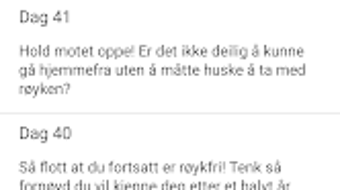
- Daily Motivation Messages: Delivers personalized messages to encourage persistence and reinforce commitment during challenging moments.
- Financial Savings Calculator: Tracks money saved by not purchasing tobacco products, providing a clear economic benefit of quitting.
- Toxin and Health Insights: Displays information about harmful substances in tobacco smoke and snuff, alongside expected health improvements over time.
- Quitting Process Planner: Offers tools to help users prepare for their quit date, including step-by-step guidance and milestone setting.
- Message Archive: Stores past motivational messages for review, allowing users to revisit past encouragement during tough phases.
- Improved Stability and Design: Features updated UI elements and enhanced reliability, improving the overall user experience.
- Personalized Notes: Enables users to record personal reflections, challenges, and achievements related to their quitting journey.
These features are designed to support users through all stages of quitting, from preparation to long-term maintenance. The financial tracker helps users visualize progress in monetary terms, while the health insights provide scientific context for their efforts. The message archive and personal notes allow for deeper personalization and emotional support, making the app more than just a tool—it becomes a companion in the quitting process.
User Interface, Workflow & Performance
The user interface of Slutta Classic appears to be designed with simplicity and clarity in mind. Navigation is likely structured around a central dashboard that displays the quit counter, daily messages, and key statistics. Users can access the planner, health insights, and notes through clearly labeled menu options. The updated design suggests a modern, clean layout that enhances readability and reduces visual clutter.
Workflow efficiency is supported by intuitive access to core functions. Setting a quit date, viewing daily messages, and reviewing saved notes can be completed with minimal navigation steps. The app’s stability has been improved compared to earlier versions, suggesting fewer crashes or freezes during regular use. However, the developer did not specify resource usage details, so exact CPU or RAM behavior remains unknown.
Performance observations are based on general software behavior patterns. The app is expected to run smoothly on standard desktop systems, but exact performance metrics were not provided. Users can expect consistent access to features without noticeable delays, assuming typical system conditions. The app does not require constant internet access, allowing for offline use of core features.
Compatibility & System Requirements
Slutta Classic is available for desktop platforms, though the specific operating systems are not fully detailed. The developer did not specify exact system requirements, including minimum hardware specifications such as processor speed, RAM, or storage space. Installation size is also not provided.
Platform compatibility information is limited. While the app is marketed as a desktop application, the exact support for Windows, macOS, or other systems was not stated. Users should exercise caution when installing on unfamiliar systems and verify compatibility before proceeding. The developer did not provide a list of supported versions or update mechanisms.
Pros and Cons
Pros
- Free to use with no cost barrier to entry.
- Comprehensive quitting support with multiple motivational and educational tools.
- Financial savings tracker adds a tangible incentive to stay tobacco-free.
- Improved stability and updated design enhance usability.
- Supports transfer of quit dates from previous versions.
- Offers both health insights and personal note-taking for deeper engagement.
Cons
- Exact system requirements were not listed.
- Platform compatibility information is incomplete.
- Performance details such as CPU or RAM usage were not specified.
- Limited information on update frequency and future development.
- No details on data privacy or security practices.
FAQ Section
Is Slutta Classic available for Windows and Mac?
Platform compatibility information is limited. The developer did not specify which operating systems are supported.
Is the app free to download and use?
Yes, Slutta Classic is marketed as a free tool to support individuals quitting smoking or snus.
Can I transfer my quit date from the old app?
Yes, users who previously used the older version of the app can transfer their end date to Slutta Classic.
Does the app require an internet connection?
The app is designed for offline use of core features. However, some functionalities may require internet access for updates or data synchronization.
How often does the app update?
Update frequency was not specified by the developer. Future upgrades are expected to include new features to enhance the quitting journey.
Final Thoughts + CTA
Slutta Classic stands out as a thoughtful and supportive desktop tool for individuals aiming to quit smoking or snus. Its blend of motivational content, financial tracking, and health education creates a well-rounded experience that goes beyond simple habit monitoring. The ability to transfer a quit date from a previous version adds continuity and value for returning users.
While detailed technical specifications are missing, the app’s focus on user experience, stability, and personalization suggests a mature product. It is particularly beneficial for those who prefer structured, self-guided support and appreciate visual progress tracking. The lack of detailed system requirements or platform details may pose a challenge for some users, but the core functionality remains accessible and meaningful.
For anyone committed to a tobacco-free life, Slutta Classic offers a reliable and free companion. Its emphasis on motivation, savings, and health benefits makes it a powerful ally in the quitting journey.
Download Slutta Classic now







